Elective Element
Last updated: July 31, 2026
Summary
A program often consists of a fixed curriculum and an elective part. While the fixed part is the same for everyone, the specific courses a participant chooses for their electives can differ per participant.
Using the Elective functionality in Eduframe, you can define an elective placeholder at the program edition level and then specify the actual courses on a per-participant basis.
This especially works well together with the 📄 Program Credits functionality, for which electives count towards the credit total.
How to add an Elective Placeholder (Program Edition level)
To allow electives within a program, you first need to add an elective element to the general program edition.
Go to the Elements tab of your Program Edition.
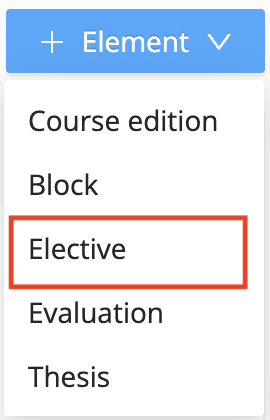
Click the + Element button.
Select Elective from the dropdown menu.
Note: You can only add one elective element per program edition. This acts as the "container" for all individual elective choices made by your participants.
Managing Electives on a Personal Program
Once the elective element is part of the program edition, you can add specific courses or blocks to an individual participant's track.
Navigate to the Enrollments tab and click on the Participant's Name.
Go to their Programs tab.
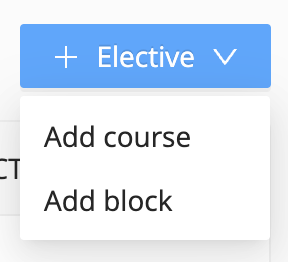
Click the blue + Elective button at the top right.
Choose whether you want to:
Add course: To link a single elective course edition.
Add block: To link a predefined group of courses.
Notes:
You can only add one elective element in the program edition elements table - but you can add an unlimited number of personal program elements as electives.
When personal programs contain elective elements, the elective element can no longer be removed from the program edition.