Products Explained: Program Templates/Editions/Blocks and Course Templates/Editions
Last updated: August 21, 2026
Summary
This article is a guide explaining Eduframe's different products or entities, and how they relate to each other:
Program Templates
Program Editions
Program Blocks
Course Templates
Course Editions
What are Course Templates and Course Editions?
Eduframe's 'course' is where the magic happens. The course is the product that can have a representation in your LMS like 📄 Canvas LMS integration, where the learning will take place.
A course is represented by two parts:
Course template
Course edition
1. Course Template
The course template is the 'timeless' part of the course. You could see it as the 'shell' of the course. It contains the information shown on your website (shop listing), like the title, description and price. In addition to this it provides a re-usable outline of the course administration course content, by housing meeting templates, task templates and email templates.
2. Course Edition
The course edition is a 'planned instance' of the course template. Each course template can have many course editions. A course edition is always based on a course template and has a start date (or duration, in case of a flexible course edition).
A course edition can have:
Teachers
Meetings
Orders
Linked invoices
Participant enrollments (most importantly)
Participants can register for course editions on your website. The course edition can also be synced to the LMS, where the learning will take place.
Find here more information about 📄 Course Editions.
Note: In our Wordpress plugin the 'edition' is referred to as 'variant'.
What are Program Templates and Program Editions?
There are occasions where you might want to offer a group of courses as one product. Think about having a master (program) that covers multiple topics (courses). You can do this with Eduframe's programs. Just like Eduframe's course, a program can have a shop listing, enrollments and results (grade, score, certificate). It however, does not have a representation in the LMS; hence, a program should always contain courses that deliver the actual learning experience.
Just like with a course, a program is represented by two parts:
Program template
Program edition
1. Program Template
The program template is the 'timeless' part of the program. It contains the information shown on your website (shop listing), like the title, description and price. Here you fill in the general information that can be re-used in your program edition.
2. Program Edition
The program edition is a 'planned instance' of the program template. Each program template can have many program editions. A program edition is always based on a program template. It houses the program course outline (program elements) and can have participant enrollments. Participants can register for program editions on your website. When a participant registers for the program it will be subscribed for both the program itself as the course editions used as elements in that program edition.
Here you can find more information on 📄 Program Editions
Note: In our Wordpress plugin the 'edition' is referred to as 'variant'.
Program Blocks
As an educator, you might want to offer long-running programs with Eduframe, or simply programs that contain many courses. For these kind of bigger programs, you might want to organise the courses part of these programs in blocks. Blocks can be re-used and can make building the program editions more efficient. Read more in 📄 Products explained: program templates/editions/blocks and course templates/editions.
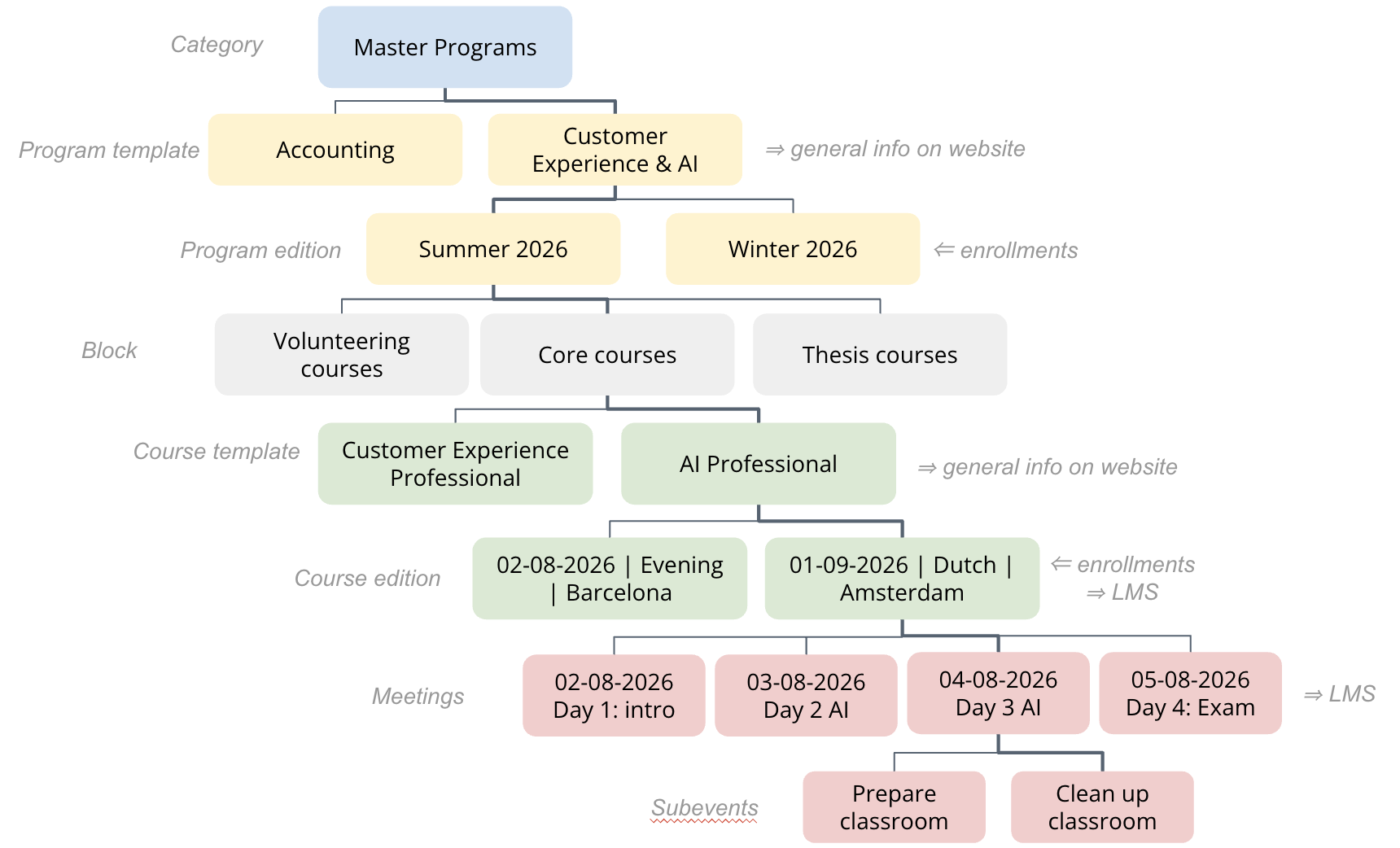
Visual representation of Eduframe structure
Below you see an image that explains the information above in a nutshell. In this image, you also see the highest layer of structure, which is a 'Category'. Next to that, Meetings and Subevents can be added to course editions.