B2B Offerings: Selling Private Product Editions
Last updated: August 21, 2026
Summary
Eduframe supports business-to-business (B2B) workflows that make it easy for institutions and educators to offer and manage private product editions for corporate clients and their employees.
This article explains how to sell private products to organizations, streamline participant enrollment by enabling direct employee self-enrollment, and manage participant and billing data efficiently.
Selling Private Product Editions to Businesses
Private product editions are typically designed for specific clients and aren't published publicly on your website. Eduframe supports the sale of these custom products by specific product editions, which can be hidden and have a restricted signup. This is ideal for B2B use cases, such as when a company wants to train a group of employees through a dedicated session.
In Eduframe, there are two main ways employees of a business client can signup for private product editions:
Via a hidden link: unguessable, shareable directly with the employees.
Via the business portal: by a key contact.
Enable Employee Self-Enrollment via Hidden Link
As an educator or institution, you may want to allow employees of your customers to sign up for a specific private product themselves, without needing an account beforehand.
Traditionally, a key contact or admin would manually enroll participants and create orders. Now, institutions can simplify this process letting employees enroll themselves:
Share a tokenized link to the private product edition.
Employees sign up themselves — with or without an existing account.
The system handles enrollment, availability checks, and order creation automatically.
Benefits
This removes the need for admins:
Collecting participant lists and enrolling them manually.
Having admins create participant accounts.
Having key contacts enroll their employees by creating order in the business portal.
Instead, simply get the hidden link and share the hidden link to the product edition with the customer which lets the employees register themselves.
Key Features
Signup with or without having an account beforehand.
Works if the template is not published.
Unguessable link to prevent unauthorized access.
Prevents cross-enrollment into other editions.
Supports pricing per edition.
Offer Added Value with the Business Portal
While self-enrollment is now easier via hidden links, institutions can still offer organizations more involvement through the Business Portal — a dedicated environment where key contacts have:
A central dashboard to view and manage participant enrollment.
List the private product editions available for the organizations key-contacts.
The ability to enroll employees directly.
Insight into history and upcoming products.
Efficient management of orders and invoices.
This gives organizations greater oversight and control over their training needs.
Learn more about the 📄 Business Portal and Key Contacts.
Ordering Private Product Editions as Key Contact
By using Eduframe's Business Portal, it is possible to make custom made products only available for ordering by organizations selected by you. The key contact of an organization is able to see all private product editions available for ordering for this organization on the business portal of the specific organization. From here, they can also create orders for these editions.
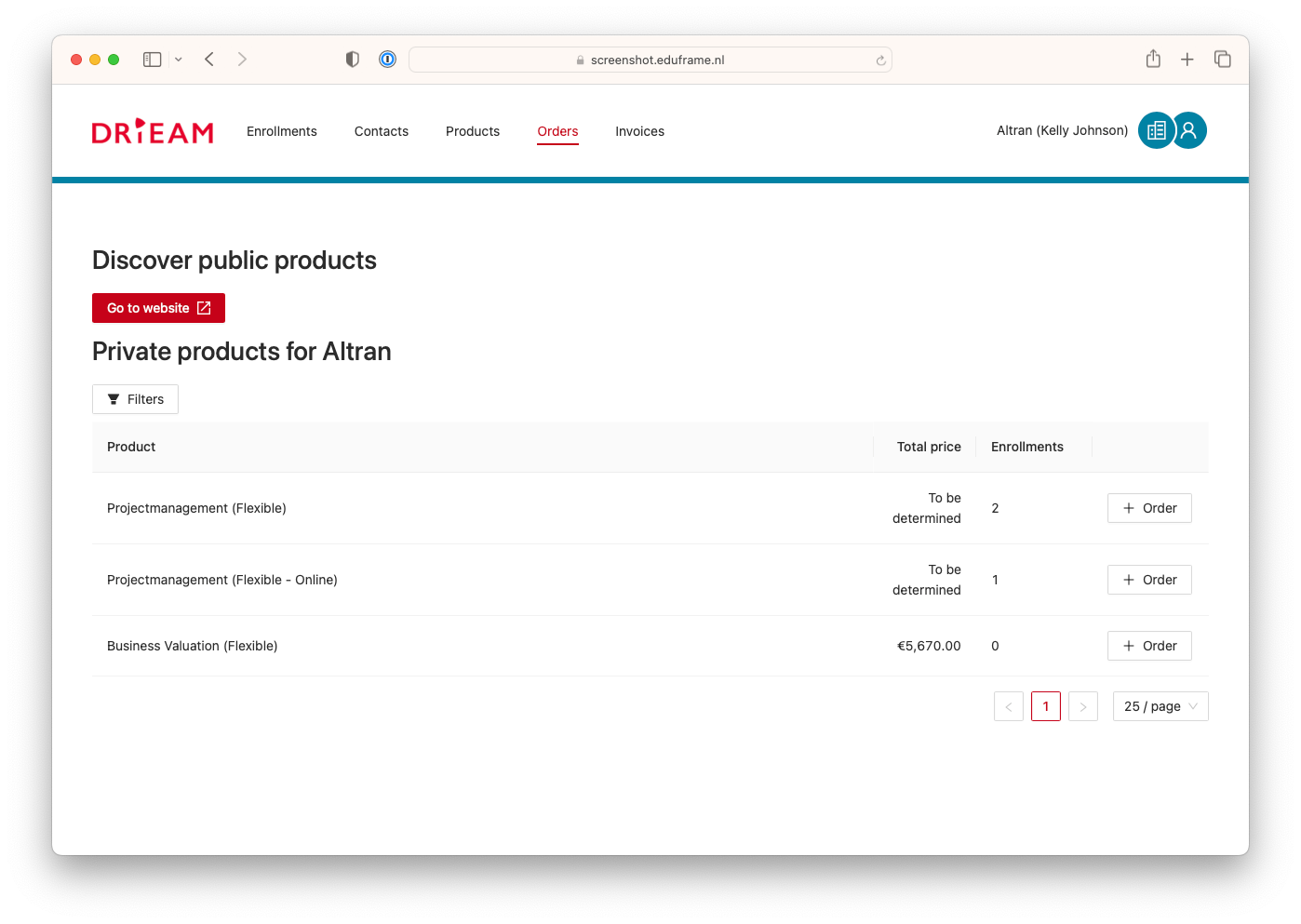
Tip: the button 'Go to website' takes the (key) contact to your website (when configured in 📄 Account Settings) for ordering publicly available products.
Steps to Set Up and Offer Private Product Editions
We assume you have already created a product template for the product you want to sell as a private product. If not, you can find more information in 📄 Products explained: program templates/editions/blocks and course templates/editions
To sell a private product edition to a business client:
Create the product edition that you wish to offer privately.
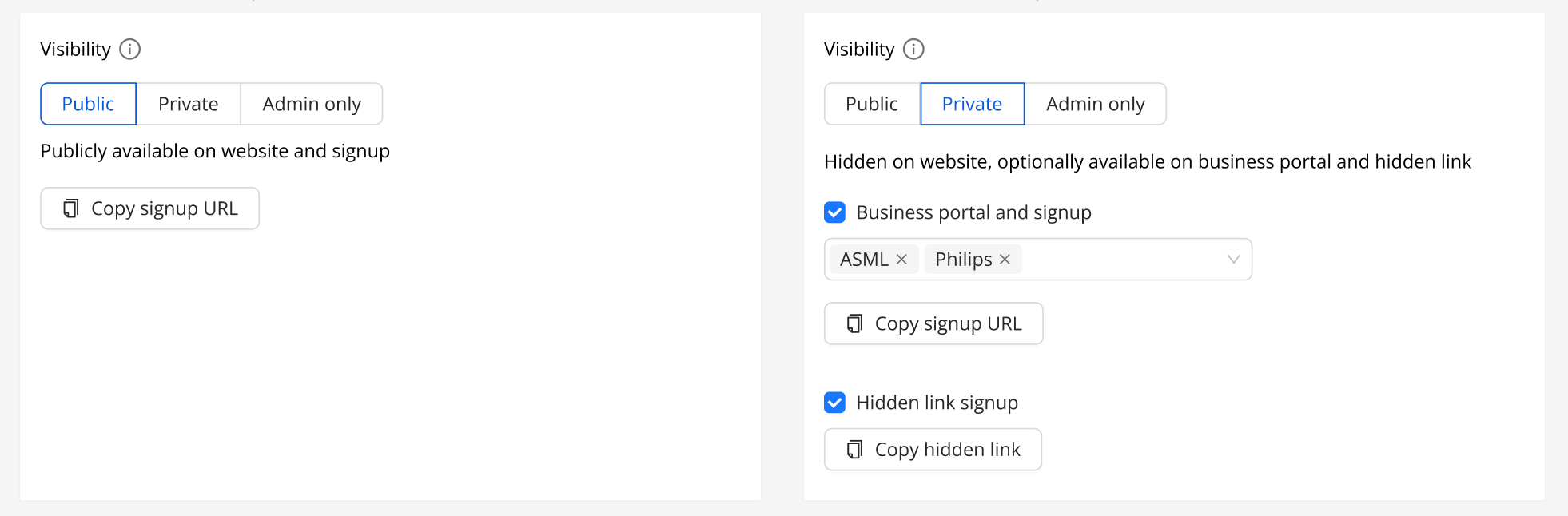
Mark the edition's visibility as private, so it's not listed on public views.
Configure if the edition should be visible:
On Business portal and signup of selected organizations.
Via the hidden link.
Save.
Copy and share the link with your client. They can distribute it to their employees.
Note: Private product editions cannot be published on the website as publicly available. Find more information in 📄 Visibility of Products and Categories on the Website and Signup Form.
Participants can use the link whether or not they already have an Eduframe account.
Key Contacts can find and enroll participants in the private product via the business portal (if enabled).
Managing Invoices for B2B Participants
When a new participant enrolls via a hidden product link and specifies a business for billing, with the new organizations feature, Eduframe creates a personal business address, not a new organization.
Read more about this process here: 📄 Facilitating B2B operations in Eduframe.
Summary of what Private Products Editions can and cannot do
Eduframe enables you to offer flexible and secure private training options for organizations — whether through hidden links or via a dedicated Business Portal. Here’s what private product editions currently support:
Can do
Product editions can be configured as private.
Private products editions are automatically not visible on the website.
Private product editions can be made available for one or multiple organizations.
Key-contacts can place orders for private product editions made available through the business portal.
Key-contacts ánd normal contacts can place orders for private product editions made available through the hidden link.
Private product editions can be configured with a set price.
Can not do
Product templates cannot be configured as private.
Categories cannot be configured as private.