How to Reduce Duplicate Organizations?
Last updated: August 31, 2026
Summary
In 2025 and 2026, the B2B ordering flow in Eduframe has been improved. Previously, every new participant who placed a business order automatically created a new organization in Eduframe. This caused duplicated records and a cluttered CRM. Our new solution keeps your data clean, while still keeping a clear overview of your customer relationships.
Read more about this improvement in the below article.
Note: This functionality might not be activated for you yet. Interested? Reach out to us at Support.
How does the new system work?
When a participant places an order for a business he or she is not linked to yet, a new business order is created, without creating a new organization. A personal business invoice address is created instead. The admin can choose what to do with the order:
Accept the order and invoice it to the provided business invoice address
Link the order, business invoice address and its invoices to an existing organization
Link the order, business invoice address and its invoices to a new organization
Benefits:
Participants can no longer create organizations. This reduces duplicate data.
Participants can still order for any (business) invoice address they provide on the signup. No admin intervention required. This keeps conversion up.
Admins can group business orders with very little effort. This helps you stay organized and in control, while keeping your administrative load low.
Just like before, if a participant is already linked to an organization, they can order for it directly - no admin action needed. In the new organizations solution, all linked contacts (not just key contacts) can do this. See 'Can all contacts place an order for an organization?' later in this article.
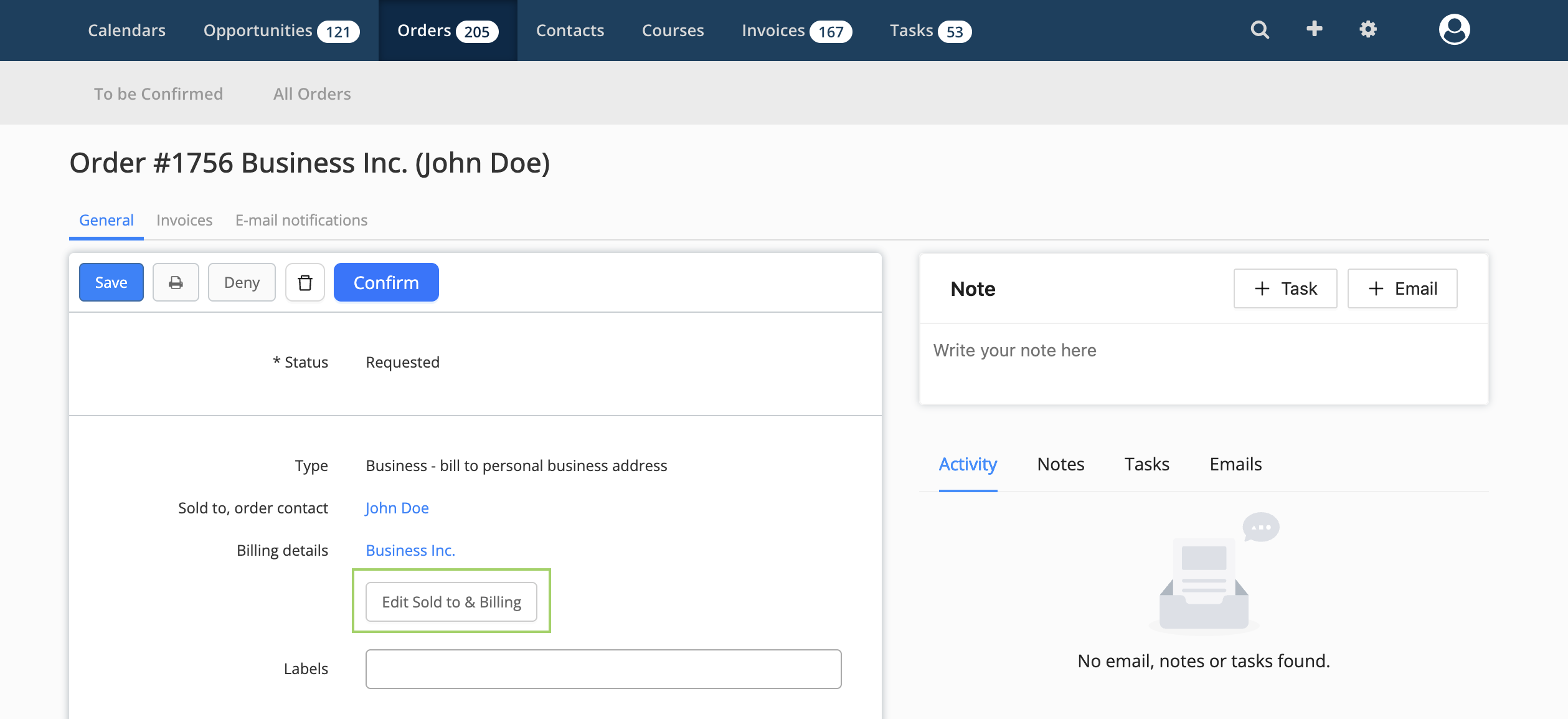
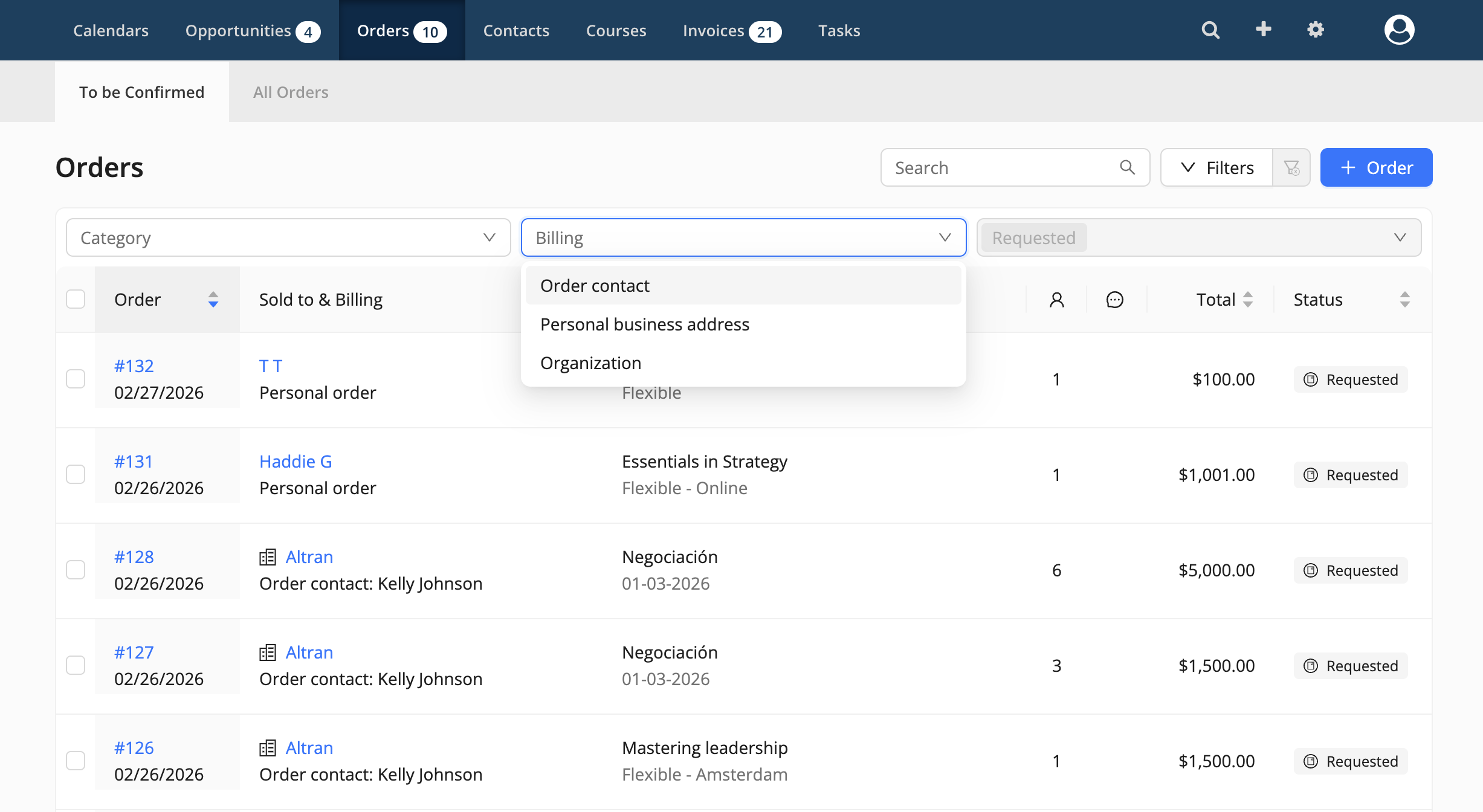
Image below: a business order not linked to an organization. Section in green highlights the business information. The button 'Invoice & link to' immediately below can be used to link the order to an organization.
What is expected from me?
To prepare for the new B2B ordering flow, there are two things we ask you to do:
1. Learn how the new flow works
We recommend reading this short guide 📄 Facilitating B2B operations in Eduframe. You can also share the guide and article you are currently reading with your colleagues so everyone is up to date.
2. Decide what to do with your existing organizations
We need to know how you’d like us to handle the organizations currently in your Eduframe environment. You have two options:
Option 1 (default): Keep all your current organizations
No changes will be made to your existing orders and organizations. This is the default migration option we will use if we don’t hear from you.
Recommended for:
When you want to keep most of the organizations. After the feature is activated, you can manually delete the organizations you no longer need.
Option 2 (on request): Start fresh (don’t keep your current organizations)
We will not re-add your existing organizations. Your existing orders for organizations will still be saved as business orders, but will be linked only to personal business invoice addresses instead of organizations.
Recommended for:
When you want to keep only a few organizations or start from scratch. Want to make use of this option or need help? Contact us and let us know.
Frequently asked questions (FAQ)
1. Do I have to use organizations?
No. Even when the new system is active, you’re not required to use organizations. If you prefer not to use any organization features, that’s totally fine. You can still invoice businesses using business orders and personal business invoice addresses.
2. Can all contacts place an order for an organization?
Key contacts have the same capabilities as before. Whether regular contacts are currently allowed to order on behalf of the organization depends on your environment’s configuration. In the first version of the organizations solution, regular contacts can always place orders for their organization - with some limitations. Below you can find more details on how roles and rights work in the new solution:
Capability | Key contact | Normal contact |
Place orders for their organization | ✅ Yes | ✅ Yes (for themselves only) |
Invoice goes to the organization’s invoice address | ✅ Yes | ✅ Yes |
Change the organization’s invoice address during signup | ✅ Yes | ❌ No |
Access the business portal | ✅ Yes | ❌ No |
Order on behalf of others | ✅ Yes | ❌ No |
Add new contacts to the organization | ✅ Yes (via the signup) | ❌ No |
Select existing organization contacts to order for | ✅ Yes | ❌ No |
3. What are Eduframe’s organization features?
Using organizations gives you access to more features, like:
Grouping of orders, contacts, and invoices
Business portal access, including the key contact role
Private products
Organization opportunities
Organization notes & tasks
If you require any of these features, we recommend using organizations.
4. How can I find business orders that aren’t linked to an organization yet?
There are two ways:
1. On the order detail page - new personal business invoice addresses show a “New” label for 7 days.

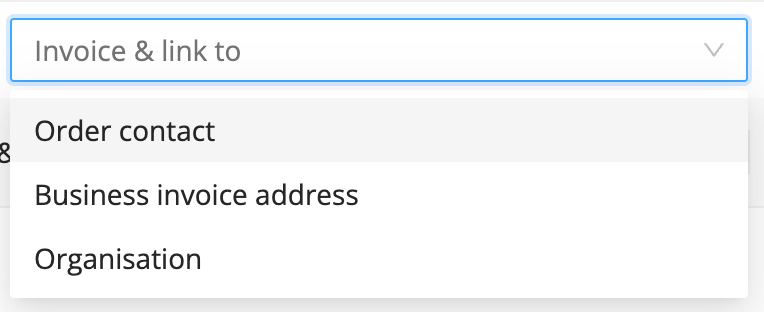
2. On your order overview - you can filter your orders on orders that are:
a) personal
b) linked to a personal business invoice address
c) linked to an organization.
Note: orders that are linked to a personal business invoice address are business orders which are not linked to an organization.
5. Can an organization have multiple useable invoice addresses?
Not as of now - but the changes in this update make it technically possible in the future.
6. Can a participant re-use a personal business invoice address they created before?
Yes - if the personal business invoice address hasn’t been linked to an organization, the participant can re-use it. But: once it is linked to an organization, participants will select the (primary) organization business invoice address instead, not the address they created before.
7. What can I do with a business invoice address?
A personal business invoice address works just like a personal address for invoicing. It allows B2B orders, but does not include any organization features. Also: Only the person who created a business invoice address can use it (unless it's linked to an organization). Thats what makes it 'personal'.
8. What shows up in the business portal?
Everything linked to an organization is visible in the business portal of that organization:
Orders
Contacts
Invoices
If an invoice has already been sent before linking to an organization:
The invoice itself won’t change.
But it will show up in the business portal via the connected business invoice address.
9. Can I label my organizations, using the new system?
Yes. We recently re-introduced this functionality.
10. Can I upload file attachments for the organization?
The new organization system no longer includes file attachment functionality. This functionality was rarely used and is phased out with the introduction of the new organizations.
11. Can I send emails to organizations from the organization timeline?
The new organization system no longer includes organization timeline email functionality. This functionality was rarely used and is phased out with the introduction of the new organizations.
12. I'm making Power BI reports or using the Eduframe API. Will this be affected?
Possibly. This depends on your usage. Are you using organization data, including organization (key)contact data? In that case you might be affected. You can read more about this on https://docs.eduframe.nl/docs/powerbi/organization-changes
13. I'm using the Eduframe API. Will this be affected?
Possibly. This depends on your usage. Are you using (data from) '/accounts/' or '/affiliations/'? In that case you might be affected. You can read more about this on https://docs.eduframe.nl/docs/api/changelog
When can I start using this?
From August 2025 onwards. The general go-live date of the organization change will be communicated via our newsletter. Custom go-live dates can be arranged with us directly. Reach out to us if you are interested.